
|
|
| Patents # US 9,389,827 B2, US 8,738,163 B2, US 8,793,580 B2, GB2454106 |
Pure Vinyl™High-resolution vinyl LP archival, playback, editing and music server softwarePure Vinyl is much more than just recording software. It's a sophisticated system for getting the most from your treasured LP records!
Pure Vinyl 5 preview available. The Pure Vinyl 5 preview can be used in place of Version 4 to embrace the functionality of major and minor new features; the download link to the latest preview update can be found on our News page. This is a free upgrade under a Pure Vinyl 4 license code (contains the string "PuVa-40000" or higher). A discounted upgrade for Pure Vinyl 3 and earlier licenses is available. Click the Buy button for more information. Pure Vinyl 5 includes over 50 new features and performance improvements over Pure Vinyl 4. A few of the major new features added in Pure Vinyl 5:
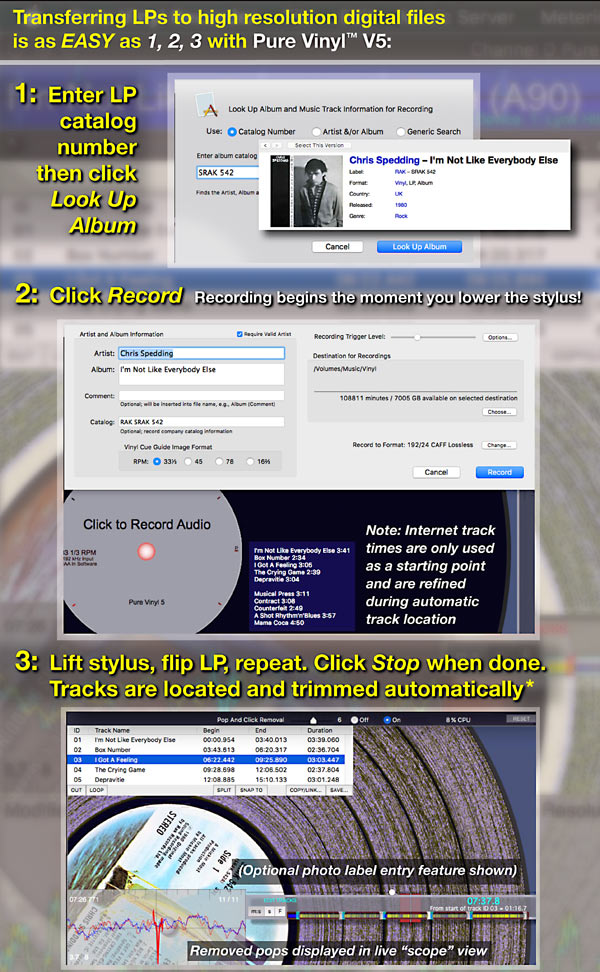
* The track locator functions best on albums with breaks between tracks, typical of most LPs. The track locator also is designed to function with those "live" or classical albums mixed with negligible interruptions between tracks, and to accommodate fade-ins or fade-outs / final note decays. The free demo download allows evaluating its performance in your own usage scenario. 
Linking analog LP playback with the precision of high-resolution digital music reproduction
Comments from Pure Vinyl users
"I love to listen to my records with Pure Vinyl... After I connected the cartridge, the sound became much more 3D and the reverb tails are much longer and wider, also the dynamics are bigger. My cartridge is the Van Den Hul MC Two Special mounted in the SME titanium tone arm."
"The results were stunning- some of the quietest, best sounding vinyl playback I have ever heard."
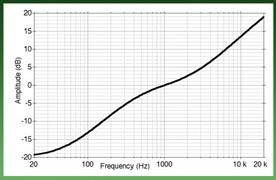
Software RIAA Curve* Advantages for Real-Time Playback*Pure Vinyl's RIAA and other curves are continuous time, minimum-phase filters, the same as analog filters.
Software RIAA Curve Advantages for High-Resolution Digital TransferAll of the above advantages, plus:
***A zero-phase-shift rumble filter cannot be made with analog circuitry. 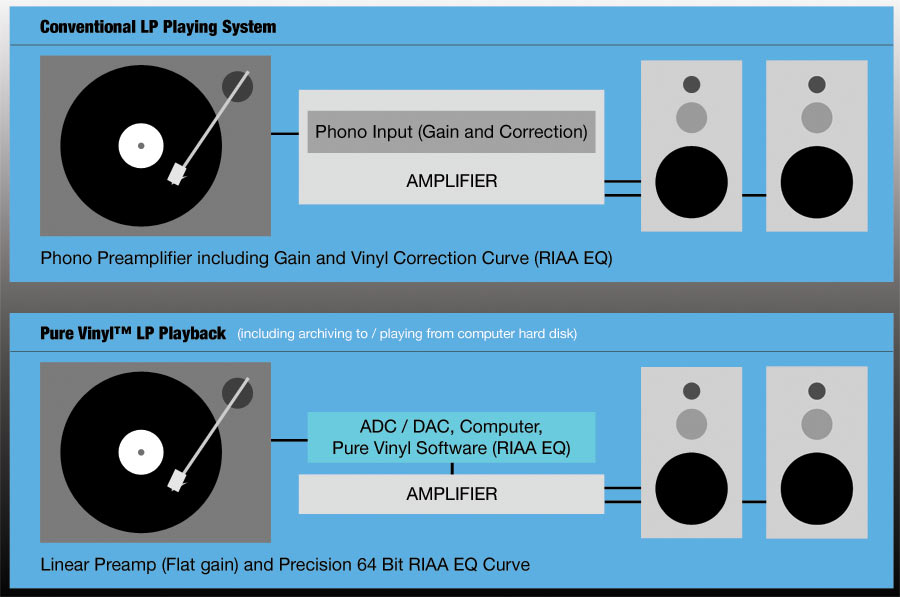
What you needYou'll obtain spectacular results with any equipment depicted below and your existing turntable setup. (In case you have a USB turntable, adding an ADC/DAC such as the Scarlett below and using the turntable analog output instead of the USB output will deliver a substantial improvement in quality.)Example #1: Entry Level ADC/DAC (built-in preamps): Focusrite Scarlett 2i2 (2nd Gen) 192/24 USB Audio Interface (available at Amazon and other retailers). 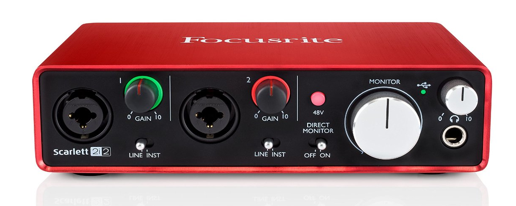 The Scarlett and similar ADC/DACs include adjustable-gain, built-in preamplifiers that accommodate low output moving coil as well as moving magnet cartridges. A set of adapters is required to connect your turntable (RIAA EQ provided by Pure Vinyl software). A $50 adapter discount coupon is available if you have purchased a Pure Vinyl license; or $50 off a Pure Vinyl license after an adapter purchase. There are other ADC/DACs at higher prices, offering better quality analog to digital and digital to analog conversion (plus higher output channel count, which can be used for multi-amping via Pure Viny's built-in adjustable crossover). But the disparity in performance across different prices is not as great as it was even just a few years ago. Outstanding quality is now available for extremely reasonable prices. Incidentally, a line-level preamp isn't required; the line outputs of the ADC/DAC may be connected directly to your power amplifier(s), with playback volume controlled in Pure Vinyl software. Always choose an ADC that includes a DAC in the same unit, such as shown above or below, rather than adding a stand-alone ADC to an existing digital playback system and using a stand-alone DAC for audio monitoring during recording (or "live" LP playback). This would be impractical, for reasons explained here. Of course, you can use any DAC for playback of your recordings; the distinction is that it's impractical to use a stand-alone DAC for real-time monitoring during recording. Example #2: Premium ADC/DAC plus separate preamp: Used in our audio trade show exhibit rooms for the last several years, this also comprises the heart of the reference LP to digital transfer system used at Channel D. 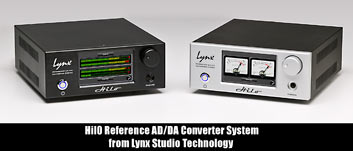 The Lynx Hilo 192/24 ADC/DAC (with unique, user-configurable touchscreen display) is popular with our users who are seeking the highest quality LP to digital transfers. The Hilo was designed and built in the USA by top audio engineers (and musicians). Lynx has been in business for over 20 years and the quality of their products is unmatched. The Hilo will also deliver superb playback of your digital music files, and supports native DSD audio output. The Lynx Hilo 192/24 ADC/DAC (with unique, user-configurable touchscreen display) is popular with our users who are seeking the highest quality LP to digital transfers. The Hilo was designed and built in the USA by top audio engineers (and musicians). Lynx has been in business for over 20 years and the quality of their products is unmatched. The Hilo will also deliver superb playback of your digital music files, and supports native DSD audio output.
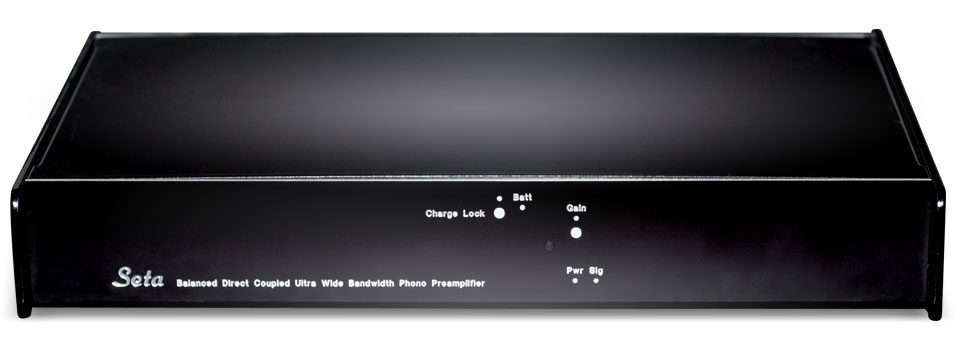 Mastering-quality ADC/DACs such as the Hilo usually have line level inputs requiring a separate phono preamplifier. To take advantage of the RIAA EQ feature in Pure Vinyl software, a "flat" (non-RIAA) preamplifier is needed. An excellent choice is our Seta Model L for low output moving-coil cartridges. Also built in the USA, the Seta has been rated a "Class A" phono preamplifier by Stereophile magazine since 2010 and listed in Stereophile editor John Atkinson's Associated Equipment sidebar for his audio component reviews for over 5 years, since December 2013. (He even purchased the review sample!) This combination will deliver unmatched results for high resolution vinyl transfers. Our Seta Piccola (MC/MM) and Lino C (MC) phono stages also are outstanding products, and good matches with the Hilo or other ADC/DACs. In a 2015 shootout of seven different ADCs on Michael Fremer's Analog Planet website, the $4,750 (total) Hilo ADC + Seta Piccola combination tied for first place in reader votes as sounding the best, based on the posted sample files. The other first place winner employed a $26,000 phono preamp + $2,600 step up transformer - not including the price of the analog to digital converter. Playing LPs with Pure Vinyl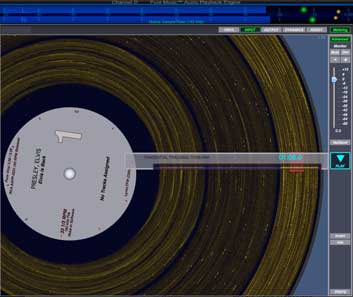 The PLAY mode of Pure Vinyl was designed to closely recreate the experience of vinyl playback. Just as in the editing process, the stylus can be dragged and dropped anywhere on the surface, to cue a particular track. This is made simple by employing the spinning vinyl record metaphor. To flip the record, juct click on the label. Records with more than two sides (double, triple, etc. albums) can be used with the player - each click moving to a different side of the next disc. Pure Vinyl also can automatically "flip" the record at the end of the side - for uninterrupted playback in "album" format.. but better, because there's no stylus wear with repeated play, nor a vinyl surface to scratch. Every play sounds like the first one - at super quality 192 kHz 24 bit. Recording LPs with Pure Vinyl
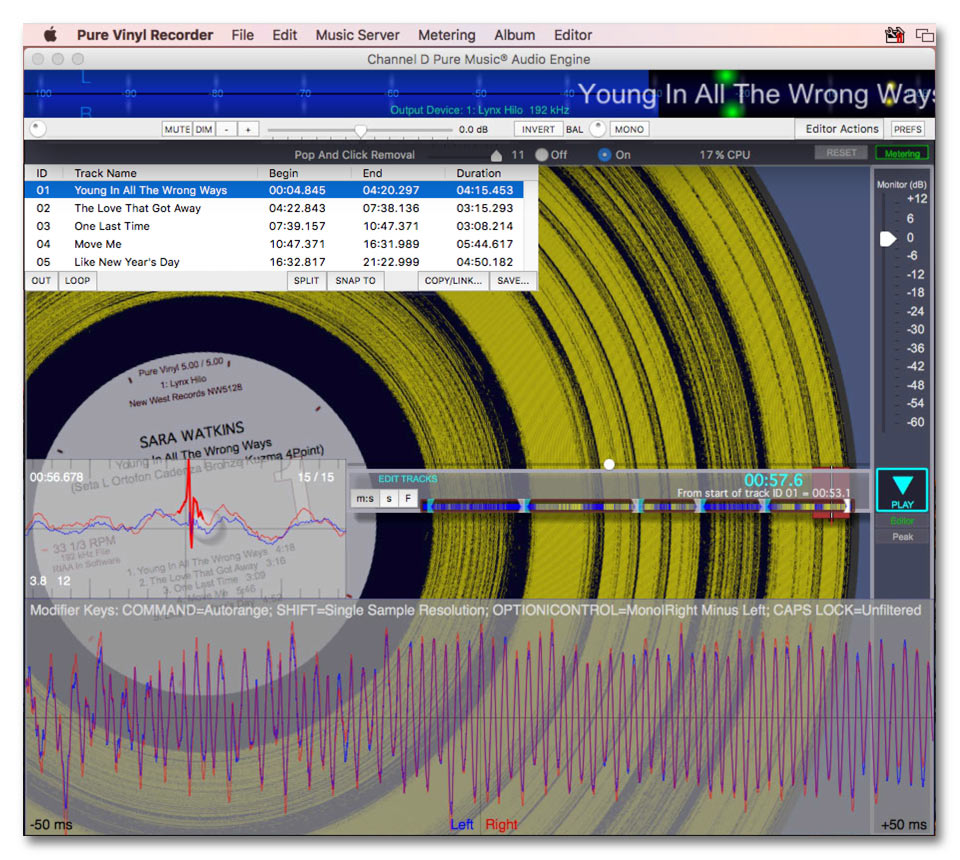
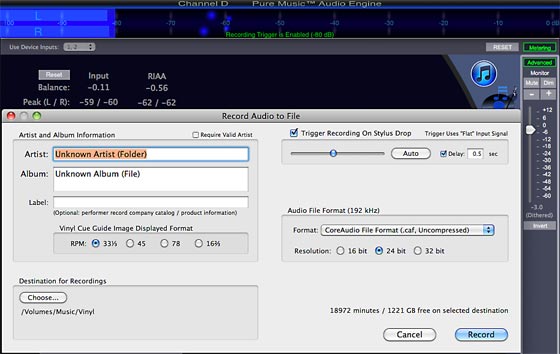
Naturally, the Pure Vinyl Recorder can apply precision RIAA EQ in software... high-quality output is provided for flawless monitoring while recording, using the software-based EQ, if desired. The adjustable, threshold-based triggering feature doesn't start recording until the needle drops - and even can be configured to omit that "needle drop" part of the recording. When the tonearm is lifted at the end of the side, the triggering pauses the recording, giving you the opportunity to flip the record, clean the other side, grab a snack, etc. At this time, the application is "deaf" to incoming audio. When ready to resume recording, just click the Lock button, re-arming the recording. Pure Vinyl scrupulously maintains a high-quality 64-bit floating-point (double precision) processing path from the moment that the sound is sampled, through the entire downsampling operation, and on to monitoring and playback, to insure that you don't lose any of your precious sound. Downsampling (decimation), if creating track files in other formats is desired, is properly performed, using widely vetted techniques. For example, 192 kHz audio is first upsampled and zero-padded, then antialias filtered and decimated. All sound file formats used are lossless: AIFF or Apple's CoreAudio (.caf). The latter format permits recordings of unlimited duration with any sample rate or sample size. Exporting sound files to 16-bit (or 24 bit) 44.1 kHz CD format is done using Apple Lossless Compression (to .m4a) or AIFF. If lossy (mp3, aac) compression is needed, the pristine audio files can be compressed by converting via iTunes. Editing LPs with Pure Vinyl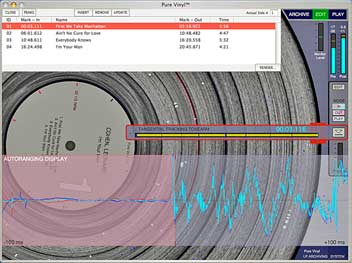 The inherent surface noise of vinyl makes track cue assignment difficult, because music fades are contaminated with surface noise. Linear-style waveform editors are not quite up to the task of working with digitized vinyl. Using apparently quiet waveform locations as track boundaries, without careful auditioning of selected marks, is likely to result in track marking mistakes. Pure Vinyl uses a patented "virtual vinyl" cue guide image generator coupled with a DJ-inspired "scratch" technique where the record is "grabbed" and "spun" to accurately locate cueing points. A Looping feature allows precisely honing or verifying the locations of track intros and fade-outs. Pure Vinyl's proprietary SNAPTO Automatic Track Locator, not found in any other software product, makes quick work of the potentially tedious task of locating track cue-ins. LPs do not fade to "digital black" between tracks, making track location much more difficult than editing purely digital recordings. However, our specialized track locator algorithm handles this difficult task with aplomb. Likewise, the Tidy Tail feature automatically trims silence from the ends of tracks, even in the presence of gradual fade-outs in recordings. After track assignment is complete, the individual tracks can be exported automatically as AIFF or Apple Lossless Compressed sound files for incorporation into digital music players, such as iTunes. Alternatively, track edits can be used with Pure Vinyl's powerful, patent-pending "bookmark" track feature in iTunes that points to the master recording file, allowing incorporating vinyl tracks into iTunes playlists without needing to waste disk space on separately rendered track files. |
Try Pure Vinyl FREE for 2 weeks! Click Demo to download.PURE VINYL 5 UPGRADE POLICY Pure Vinyl 5 System Requirements: Pure Vinyl Reviews"...pay attention to the digital RIAA's finesse and robust attacks -
particularly in the bottom octaves - and its unerring tonal
neutrality... lifting of veils from music... Listen and that's what
you're sure to hear, without an additive penalty in terms of the usual
digital edge and etch... Pure Vinyl plus peripherals offers a relatively inexpensive way to achieve
an extremely high level of vinyl playback." "...the most efficient LP-to-PCM digital transfer system I've used." Click Here to Download a Copy of the Review Steven Stone, The Absolute Sound - December 2013 "...it has not only met my expectations, but exceeded them." Click Here for Review Larry Borden, Dagogo - May 2014 " the results were stunning- some of the quietest, best sounding vinyl playback I have ever heard." Nels Ferre, enjoythemusic.com - March 2010 "One of the nicest and most feature-laden software packages for transferring LPs to digital files."
Steven Stone, The Absolute Sound
- February 2009 (Issue 190) Pure Vinyl User Comment"Wow. It is hard to explain what I am enjoying more... the vinyl recordings
or the quality of the Pure Music upsampling through the TC Impact Twin. I
am glad I stayed on the path and bothered you so much. What a pay off. My
HDCD player is now second class. The quality even exceeds the SACD player I
just had on loan. The output from your software just matches up with my
vintage system components in a very synergistic way. I do not have top of
the line stuff but you have helped take the old stuff to an entirely new level. Pure Vinyl FeaturesHigh-Quality Playback - Pure Vinyl applies an extremely accurate inverse - RIAA vinyl correction curve in real-time during playback. Your music is reproduced as accurately as possible, by eliminating the distortion and frequency response errors of analog based hardware. Sample 192 kHz / 24 bit snippet of "Fever," from the new "Elvis is Back!" 45 RPM 2-disc Analogue Productions reissue LP, rated "10" for sound quality by musicangle. Edited from a "Flat" 192 kHz transfer to digital using a Seta® Model L preamplifier and Lynx audio interface. RIAA correction via Pure Vinyl SRC "pass through" setting, and Pure Vinyl's adjustable 72 dB / octave ZEPHRR® zero-phase-shift subsonic filter. If your system cannot currently play 192 kHz natively, here is a 44.1 kHz version, downsampled with Pure Vinyl's high-quality SRC. Both samples are in Apple Lossless format. Recording - Pure Vinyl was designed specifically for creating high-resolution, archival quality transcriptions of your precious vinyl, at sample rates up to 192 kHz (or higher). Pure Vinyl automatically can downsample and mirror to CD or DVD-A formats during recording, for digital jukebox use. Pure Vinyl uses standard audio file formats: AIFF, Sound Designer II, m4a (losslessly compressed) and Apple CoreAudio format (either uncompressed or losslessly compressed). Revolutionary Editing/Exporting - Pure Vinyl uses the "scratch" style, grab-and-spin metaphor employed by professional DJs, with "needle drop" track cueing. It's an intuitive, fun way to assign track markers - instead of being unnecessarily tedious, as with conventional, linear-style waveform editors. After editing, individual tracks automatically can be extracted and exported from the original file. Peak Detection / Normalization / Pop and Click Removal - Pure Vinyl incorporates features to streamline this tedious (but ultimately rewarding) task. The built-in peak finder and waveform inspector is useful for setting proper normalization levels. |
 Experienced in developing commercial application software for the Apple Macintosh platform since 1985. Copyright © 1996 - 2017 Channel D, All Rights Reserved. Macintosh, iTunes, iPod and the Mac logo are trademarks of Apple Computer, Inc., registered in the U.S. and other countries. |













 Using Software RIAA Correction does not "reduce resolution." Technical "white paper" presented at the